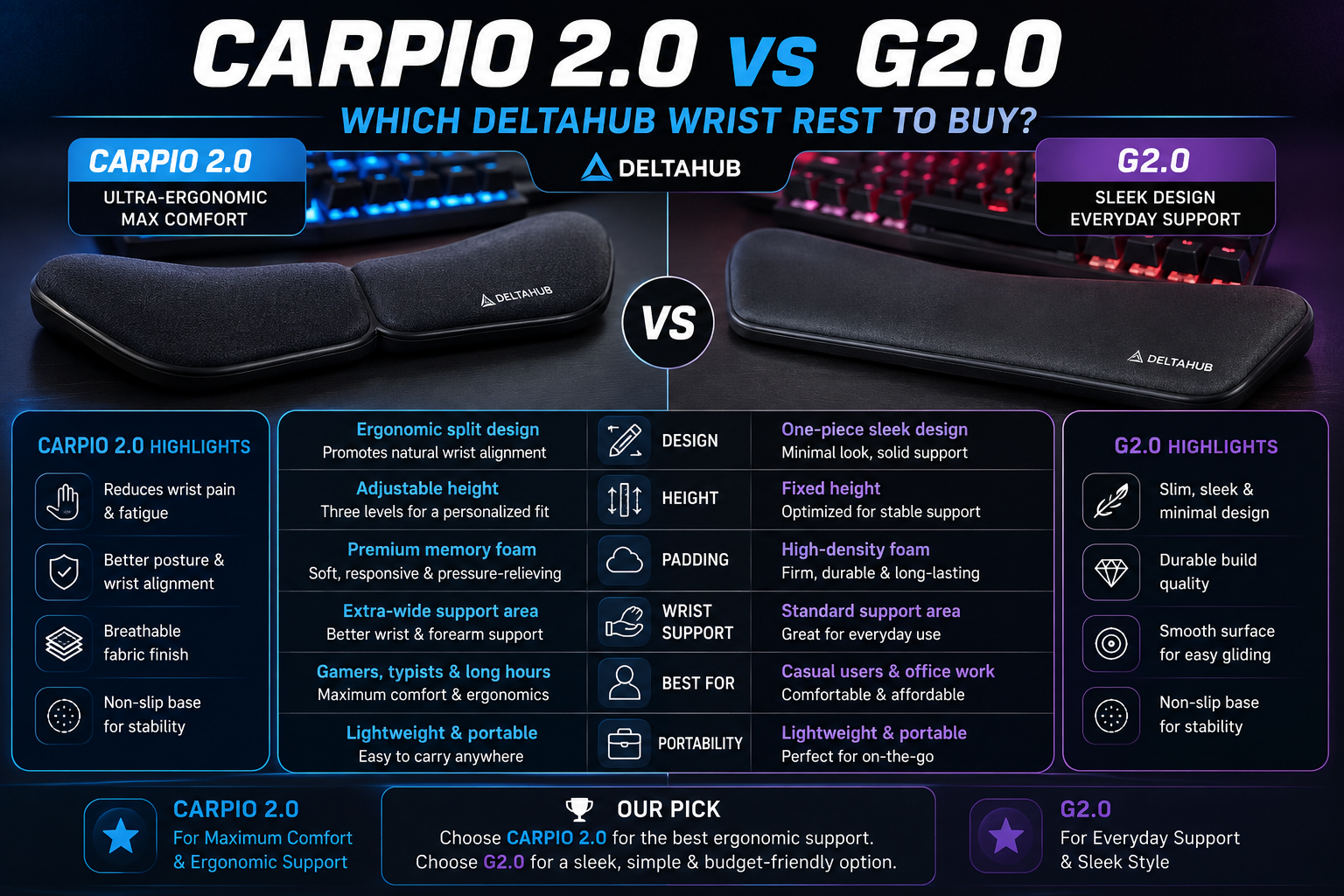
If you’ve been reading our BadSeed Tech Carpio guide or looking into ergonomic wrist rests in general, you’ve probably noticed that DeltaHub doesn’t just sell one Carpio. There are two main versions floating around: the Carpio 2.0 and the Carpio G2.0. They look similar, they’re made by the same company, and they solve the same basic problem — but they’re built for slightly different people.
This guide breaks down the real differences in plain language, so you don’t end up buying the wrong one.
The Quick Answer
If you had to pick in ten seconds:
- Carpio 2.0 — best for office work, everyday computer use, and anyone who wants the simplest, cleanest version of the gliding wrist rest.
- Carpio G2.0 — best for gamers who move fast, lift their mouse often, or want the pad locked to their wrist with a magnetic strap.
Now let’s get into why.
A Quick Recap: What Problem Are These Solving?
Before comparing the two, it helps to remember what makes a Carpio different from a normal wrist rest in the first place.
A regular foam or gel wrist pad sits in one place on your desk. Your wrist rests on it, but your hand still has to move around to use the mouse. That means your wrist bends and pivots around the pad all day, which over time can lead to soreness, stiffness, or in some cases, carpal tunnel-type symptoms.
The Carpio line takes a different approach. Instead of staying still, the pad itself glides across your desk mat along with your hand. Your wrist stays in a more neutral, straight position while the pad does the moving. Both the 2.0 and the G2.0 use this same core idea. The difference is in how each one is built around it.
What Is the Carpio 2.0?
The Carpio 2.0 is DeltaHub’s main, general-purpose wrist rest. It’s the version most people mean when they just say “Carpio,” and it’s also the base design used for special colorways like the BadSeed Tech Edition, the Linus Tech Tips Edition, and softer styles like “Liv” and “Cozy K.”
Key traits of the Carpio 2.0:
- Sits directly on your desk mat, not attached to your wrist.
- Glides using PTFE (Teflon) feet on the bottom.
- Silicone top pad for comfort.
- ABS plastic base for structure.
- Comes in small and large sizes, and left- or right-handed versions.
- Designed to work best with felt or neoprene desk mats.
It’s built for people who sit at a desk for long stretches — coding, writing, browsing, editing, or general office work — where the priority is steady, all-day comfort rather than fast, twitchy movements.
What Is the Carpio G2.0?
The G2.0 is DeltaHub’s gaming-focused version. It uses the same gliding concept and the same PTFE-on-mat system, but it adds one major feature: a magnetic strap that attaches the pad to your wrist.
Why does that matter? In fast-paced games, especially shooters or anything that needs quick flicks and lifts, your hand often leaves the mouse and comes back down fast. A pad that just sits loosely under your palm can shift out of position during those movements. The strap keeps the G2.0 locked to your wrist the whole time, so it moves with you no matter how aggressively you play, and you don’t have to reposition it mid-match.
Key traits of the Carpio G2.0:
- Same PTFE gliding feet and silicone padding as the 2.0.
- Adds a magnetic strap that attaches directly to your wrist.
- Strap can be removed for calmer, less intense sessions.
- Marketed specifically toward serious and competitive gamers.
- Available as a single pad or as a set for both hands.
Basically, the G2.0 takes the Carpio formula and adds a layer of security for people who need the pad to stay put no matter how fast their hand moves.
Side-by-Side Comparison
Here’s how the two stack up on the things that actually matter when you’re deciding:
Attachment style The 2.0 rests freely on your mat. The G2.0 straps to your wrist with a magnetic clasp, so it never separates from your hand.
Best use case The 2.0 fits everyday office work, typing, browsing, and general desk use. The G2.0 is built around fast, competitive gaming sessions.
Materials Both use the same core combination — ABS plastic base, PTFE Teflon gliders, and a silicone top pad. The G2.0 simply adds the strap hardware on top of that base design.
Stability during fast movement The 2.0 can shift slightly if you lift your hand off the mouse quickly and set it back down in a different spot. The G2.0 stays attached the entire time because of the strap.
Flexibility The 2.0 is a bit more “set it and forget it,” since there’s nothing to buckle or adjust. The G2.0 gives you the option to strap in when you need stability, or detach the strap when you don’t.
Look and feel The 2.0 has a cleaner, more minimal look, which is part of why it works well for the colorway collaborations like BadSeed Tech and Linus Tech Tips. The G2.0 has a slightly more “gear” look because of the visible strap.
Price Both sit in a similar price range for a single pad, though sets (both hands) or the strap hardware on the G2.0 can push the total a little higher than a basic 2.0 purchase. Prices shift over time, so it’s worth checking the current listing before buying either one.
Which One Fits Your Setup Better?
Pick the Carpio 2.0 if:
- You mainly do office work, writing, design, or coding.
- You want the simplest version with nothing extra to fasten.
- You’re drawn to one of the special color editions, like the BadSeed Tech dark colorway.
- Your mouse movements are steady and controlled rather than fast and twitchy.
Pick the Carpio G2.0 if:
- You play fast-paced or competitive games where your hand leaves the mouse often — check out our Gaming Health section for more on avoiding wrist strain during long sessions.
- You’ve had a regular wrist rest slide out of position mid-game before.
- You want the option to strap in for intense sessions and unstrap for casual ones.
- You don’t mind a slightly more “gaming gear” look on your desk.
If you split your day between work and gaming, either one can technically handle both jobs — the core gliding mechanism is the same. The real question is just how much your hand leaves the pad during fast movements. If that happens a lot, the strap on the G2.0 will save you from constantly readjusting.
Setup Compatibility: What to Check Before Buying
Regardless of which version you choose, a few compatibility details apply to both:
Desk mat matters. Both the 2.0 and G2.0 rely on PTFE gliders sliding across a smooth surface. They work best on felt or neoprene desk mats. A hard, rough, or textured desk surface can make the gliding feel stiff or inconsistent, so if you don’t already have a smooth desk mat, it’s worth picking one up alongside your Carpio.
Keyboard and mouse height matters. Both versions sit low to the ground by design. If your keyboard’s front edge is taller than roughly 1.5 cm, or if you use a tall vertical or ergonomic mouse, the Carpio can end up sitting lower than your hand naturally rests, which throws off the angle. DeltaHub sells a separate riser accessory (Carpio Mods) specifically to fix this height mismatch for taller setups.
Handedness and size still apply. Just like the standard Carpio 2.0, the G2.0 comes in left- and right-handed versions, and in different sizes. Don’t skip this step — a size that’s too small or too large for your palm will undercut the comfort benefits either version offers.
A Note on the Medical Claims
DeltaHub says both the 2.0 and G2.0 were developed with input from a hand and wrist surgeon, along with feedback from tens of thousands of users during testing. That’s worth knowing, but it’s also company-sourced information rather than independent published research. It doesn’t mean the design isn’t thoughtful — it clearly draws on real anatomical study — but if you’re dealing with ongoing or serious wrist pain, a desk accessory like this should support good habits alongside professional medical advice, not replace it.
Common Questions
Can I add the G2.0 strap to a regular Carpio 2.0? No. The strap is built into the G2.0’s design and isn’t sold as a separate add-on for the standard 2.0.
Is the G2.0 heavier or bulkier because of the strap? Slightly, but not enough to change how it glides. The strap adds a small amount of material around the wrist, not extra weight under the palm.
Do both versions use the same sizing? Yes, both come in small and large, and both come in left- and right-handed versions, so sizing logic carries over between them.
Is the G2.0 overkill for casual gaming? Not necessarily — you can remove the strap when you don’t need it. But if you’re a casual player who mostly does slow-paced or single-player games, the standard 2.0 will likely feel just as good for less money.
Which one is used in the special edition colorways, like BadSeed Tech? The special creator editions, including the BadSeed Tech Edition, are built on the Carpio 2.0 base, not the G2.0. If you specifically want one of those colorways, you’ll be getting the 2.0 design with the strap-free setup.
Final Verdict
The Carpio 2.0 vs Carpio G2.0 aren’t competing products — they’re the same core idea aimed at two different kinds of users. The 2.0 is the cleaner, more universal option that works well for anyone spending long hours at a desk, and it’s the version behind most of the creator colorway editions. The G2.0 takes that same gliding system and adds a magnetic strap for people whose hands move fast and often leave the pad, which mostly means competitive gamers.
Neither one reinvents what a wrist rest can do differently from the other — the gliding mechanism, materials, and general comfort benefits are shared between them. The decision really comes down to how your hand behaves during use: if it stays close to the mouse most of the time, the 2.0 is simpler and just as effective. If your hand lifts off and lands back down constantly, the strap on the G2.0 will keep things in place without you having to think about it.
Whichever one you land on, remember the two setup details that affect comfort the most: use a felt or neoprene mat for smooth gliding, and check your keyboard and mouse height before assuming it’ll sit at the right angle out of the box.
If you’re still building out the rest of your setup, browse our Ergonomic Gear section for more reviews on mice, keyboards, and desk accessories that pair well with a Carpio.