

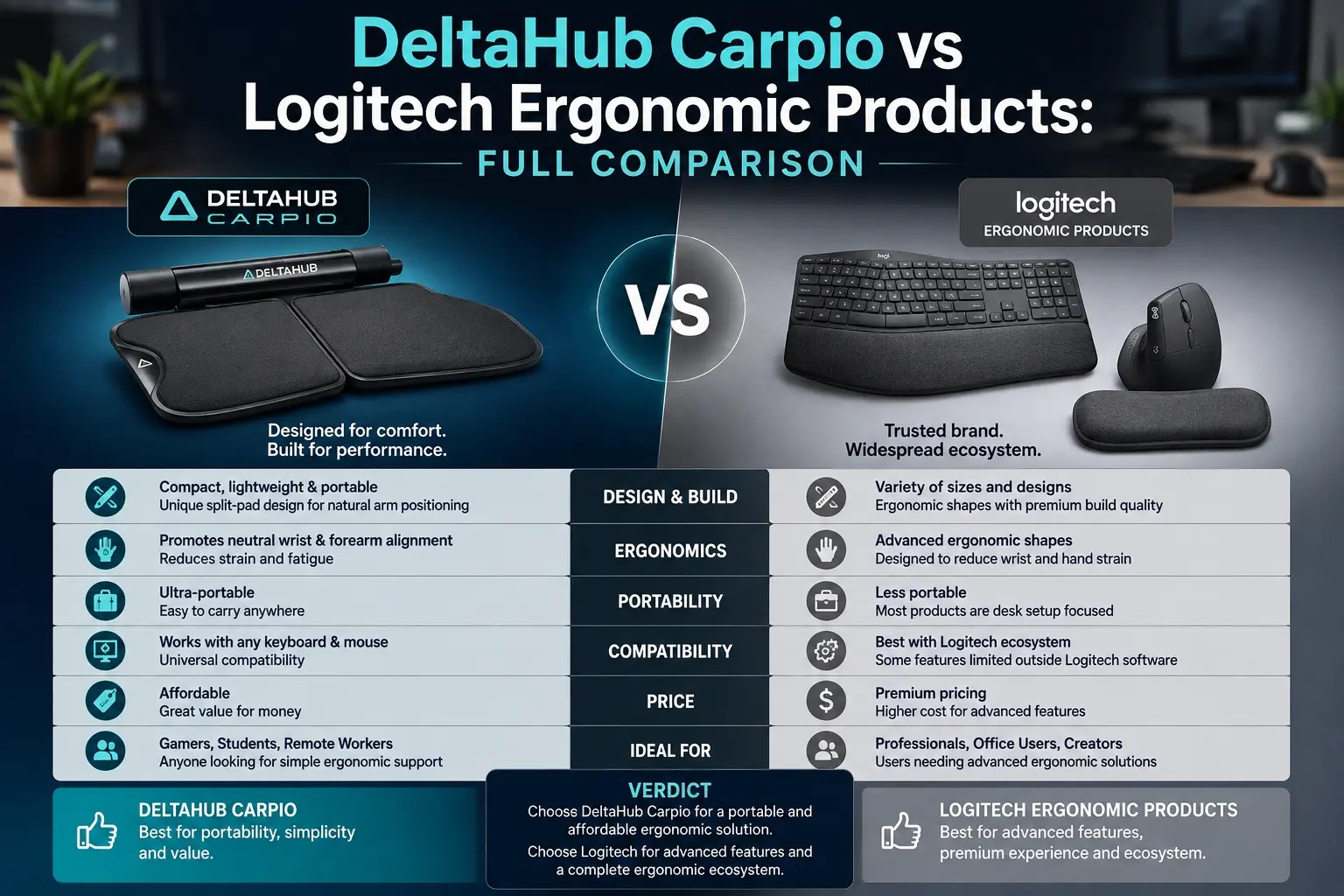
Has your wrist been complaining after long hours on a mouse? You’ve probably run into two very different names while researching a fix. DeltaHub makes the Carpio wrist rest. Logitech builds an entire “Ergo” lineup around vertical mice, split keyboards, and its own palm rest.
People compare these two constantly, but they don’t actually solve the same problem the same way. DeltaHub is a small, focused accessory company that makes essentially one product category: gliding wrist support. Logitech is a full peripherals manufacturer, and its ergonomic lineup spans mice, keyboards, trackballs, and rests, each built on a different design idea. Knowing that difference matters more than picking a “winner,” because the right choice depends on what’s actually causing your discomfort.
This DeltaHub Carpio vs Logitech Ergonomic comparison breaks down what each company makes, how their design approaches differ, what the research says about wrist support, and which option fits your setup and symptoms.
What DeltaHub Actually Makes
DeltaHub is much smaller and more specialized than Logitech. Its flagship product, the Carpio, comes in two main versions:
- Carpio 2.0 — a shaped, soft-plastic wrist rest with PTFE (Teflon) feet on the underside, priced around $39.99. It doesn’t stay fixed in place like a traditional gel wrist rest. Instead, it glides with your entire arm as you move the mouse, so your wrist doesn’t have to twist or lift off a stationary pad.
- Carpio G2.0 — a gaming-oriented variant priced around $39.90–$44.90. It adds a removable, magnetically-attached strap that keeps the rest on your hand even during fast, aggressive mouse movements common in shooters and other twitch-reflex games.
DeltaHub says it co-designed the Carpio with Dr. Marko Mikša, a plastic and reconstructive surgeon who has performed carpal tunnel surgeries, along with several occupational medicine physicians. The company also cites over 400,000 units sold. Both versions ship in left- and right-handed models and two sizes.
For a deeper look at the company itself, our What Is DeltaHub? The Company Behind the Carpio Ergonomic piece covers its background in full. If you’re trying to decide between DeltaHub’s own two models, check our Carpio 2.0 vs Carpio G2.0 breakdown.
Outside the Carpio line, DeltaHub also sells desk mats and a small range of other desk accessories. The wrist rest remains its core, defining product — this is a company built around solving one specific problem.
What Logitech Actually Makes
Logitech’s ergonomic lineup is far broader, since ergonomics is just one category among many the company competes in. Here are the relevant products:
- Logitech Lift — a compact vertical mouse angled at 57 degrees, aimed at small-to-medium hands, priced around $69.99–$79.99 (frequently discounted to $45–$50). It runs on a single AA battery and comes in a left-handed version.
- Logitech MX Vertical — a larger, more full-featured vertical mouse with a steeper 57-degree angle, USB-C charging, and a higher price tag. Logitech positions it as the premium option in its vertical mouse category.
- Logitech ERGO K860 — a split, curved keyboard designed to keep wrists in a more neutral position while typing. It’s often bundled with the Lift mouse as an “Ergo” combo.
- Logitech MX ERGO — a trackball mouse that removes most wrist and forearm movement from the equation, since only the thumb operates the ball.
- Logitech MX Palm Rest — a simple, static palm/wrist rest priced around $27.99. This is the most direct head-to-head competitor to the Carpio.
Both the Lift and MX Vertical carry validation from US Ergonomics and the American Chiropractic Association’s Ergonomically Correct seal. These are third-party certifications, but it’s worth noting they largely confirm the product met ergonomic design principles — they don’t prove clinical outcomes like reduced carpal tunnel risk.
The Real Head-to-Head: Carpio vs the MX Palm Rest
If you’re comparing like-for-like accessories, the Carpio’s actual competitor isn’t the Lift or the MX Vertical. It’s the Logitech MX Palm Rest. Both sit under your hand while you use a separate mouse and keyboard, rather than replacing them.
The core difference is movement. The MX Palm Rest stays in one place, like most traditional wrist rests — your wrist pivots and extends over it as you move the mouse around the pad. The Carpio’s entire design avoids that. Its PTFE feet let the whole rest glide with your forearm, so your wrist theoretically stays in a more neutral position throughout the movement instead of acting as a pivot point.
On paper, that’s a meaningful mechanical difference, and it’s the Carpio’s main selling point. In practice, reviewer experiences are mixed. Several reviewers who tested the Carpio 2.0 described the adjustment period as awkward, with mixed feelings about whether the gliding motion felt more natural than a standard rest, even after two or more weeks of regular use. The Logitech MX Palm Rest, by contrast, is a known quantity — a simple, well-cushioned rest with no learning curve, at roughly $12–15 less than the Carpio.
If you’re weighing whether you need a rest at all, our guide on 7 Signs You Need an Ergonomic Wrist Rest is worth reading first.
Vertical Mice vs Wrist Rests: Different Problems, Different Fixes
Here’s where the comparison gets more interesting. The Logitech Lift and MX Vertical aren’t really wrist-rest competitors at all — they attack the problem from a completely different angle, literally. A wrist rest, whether it’s the Carpio or the MX Palm Rest, tries to reduce strain while you keep using a standard mouse in a standard grip. A vertical mouse changes your hand position altogether, rotating your palm into a more natural “handshake” angle instead of the pronated, palm-down position a traditional mouse forces.
Does your discomfort come specifically from forearm rotation and pronation? That’s a common complaint among long-session gamers and office workers alike, and a vertical mouse addresses it directly. A wrist rest can’t do the same, because it doesn’t change your grip — it only supports the position you’re already in. If your issue is more about wrist extension and repeated micro-movements during precision tasks, a gliding rest like the Carpio targets that mechanism more directly.
We covered this same trade-off in more depth in Vertical Mouse vs Regular Mouse: Which Actually Reduces Wrist Strain?
Keep this in mind before buying either product: they aren’t interchangeable solutions to “wrist pain.” Each one targets a different physical mechanism, and both mechanisms happen to show up as wrist pain.
What the Research Actually Says About Wrist Rests
It’s worth stepping back from marketing claims on both sides here. The broader ergonomics research on wrist rests — as a category, not specific to either brand — is genuinely mixed, and some of it is counterintuitive.
The Conflicting Evidence
Several studies going back decades found that resting your wrist on a static support during typing or mouse use can actually increase pressure inside the carpal tunnel, compared to a “floating” wrist posture. The theory: palm pressure on a fixed surface compresses the same structures a wrist rest is supposed to protect. Other research found the opposite — that wrist support reduces wrist flexion and extension, resulting in more neutral postures overall. Reviews of this evidence generally conclude that findings across different keyboard and wrist-rest designs stay inconsistent. No single design has conclusively reduced clinical symptoms or carpal tunnel syndrome rates in controlled studies.
Did You Know – Carpio 2.0 – BadSeed Tech Edition: The Full Review
What This Means for Both Brands
This matters for both companies here. DeltaHub’s pitch — that gliding avoids the static-pressure problem entirely — responds logically to that research finding, but it remains a design theory. Nobody has tested it in an independent, peer-reviewed clinical trial specific to the Carpio. Logitech’s certifications for the Lift and MX Vertical work the same way: they reflect ergonomic design review, not clinical trial results proving reduced injury rates. In both cases, the strongest evidence available comes from user-reported comfort and company-commissioned testimonials, not controlled research on outcomes like carpal tunnel syndrome incidence or nerve conduction measurements.
None of this makes either product useless — plenty of users report genuine relief from both approaches. But it does mean the honest answer to “which one is clinically proven to work better” is neither. No strong independent clinical evidence backs either brand. The best-supported general recommendation from occupational medicine still comes down to basics: reduce total mouse time, take regular breaks, and maintain a neutral wrist position, regardless of which accessory gets you there.
If numbness or tingling is part of what you’re dealing with, read our guide on Carpal Tunnel Syndrome in Gamers: When Should You See a Doctor before assuming any accessory will resolve it on its own.
Price and Value Comparison
Lined up by rough street price:
- Logitech MX Palm Rest — around $27.99, the cheapest option here, static support, no learning curve
- DeltaHub Carpio 2.0 — around $39.99, gliding support, requires an adjustment period
- DeltaHub Carpio G2.0 — around $39.90–$44.90, gaming-focused with a magnetic strap
- Logitech Lift — around $69.99 list (frequently on sale for $45–$50), a full vertical mouse that replaces your existing one
- Logitech MX Vertical — the most expensive option, a premium vertical mouse with USB-C charging
- Logitech ERGO K860 — sold separately or bundled with Lift, addresses keyboard posture rather than mouse posture
Budget-focused and just want basic palm support? The MX Palm Rest is hard to beat on price. Drawn specifically to the idea of a rest that moves with your arm instead of staying fixed? The Carpio is the more purpose-built option, though you’ll pay a premium for that mechanism. And if your discomfort is really about hand rotation rather than support, no wrist rest from either company addresses that as directly as switching to a vertical mouse would.
If price is the main barrier, our roundup of Best Carpio Alternatives Under $20 is worth a look before spending $40+ on either Carpio model.
Which One Should You Actually Buy?
A few practical scenarios:
You’re a gamer who needs rapid, precise mouse repositioning. The Carpio G2.0’s strap keeps it attached during fast flick movements in a way no static Logitech palm rest can match. A vertical mouse would actively hurt your aim in most competitive titles, so this is the clearest case for choosing DeltaHub. Our Best Ergonomic Mouse for Gamers guide covers mouse pairings that work well alongside it.
You’re an office worker on a budget with mild, general wrist fatigue. The Logitech MX Palm Rest gets you most of the comfort benefit at a lower price with zero adjustment period. There’s no strong reason to pay more for the Carpio’s gliding mechanism unless static rests have specifically bothered you before.
Your pain is really in your forearm and shoulder, not just your wrist. Neither wrist rest solves this. The Logitech Lift or MX Vertical changes your entire hand and forearm angle, which makes it a more appropriate category of product entirely.
You already use a split or ergonomic keyboard and want to address the last piece of the puzzle. Pairing something like the ERGO K860 with either a vertical mouse or a wrist rest rounds out a full ergonomic setup. From there, it comes down to whether your remaining discomfort is postural (favor the vertical mouse) or support-related (favor a wrist rest). Our Complete Ergonomic Desk Setup Guide for Remote Workers walks through how all these pieces fit together.
Bottom Line
DeltaHub and Logitech aren’t really rivals selling the same product. They represent two different approaches to a similar goal. The Carpio solves one particular mechanical problem: static pressure and wrist pivoting during mouse use. Logitech’s ergonomic lineup covers more ground, spanning a direct wrist-rest competitor at a lower price, vertical mice that change your entire grip, and split keyboards that change your typing posture entirely.
No strong independent clinical trials back either company’s marketing claims. So the most honest starting point is matching the product’s actual mechanism to where your discomfort comes from, rather than assuming the pricier or more talked-about option automatically wins.
And if wrist or hand pain persists, worsens, or comes with numbness and tingling, no accessory from either brand substitutes for getting it evaluated by a doctor.
This article is for general informational purposes and isn’t medical advice. If you’re experiencing persistent wrist, hand, or arm pain, numbness, or tingling, consult a doctor or occupational therapist before relying on any ergonomic product as a fix.
